Toolio Automation for Windows

Automate More.
Create Faster.

Run video, image, voice, CapCut, and numbered-media workflows from one Windows app. Toolio handles repetitive steps using your own supported accounts and available credits.

Free Premium trial available. No credit card required. Available once per eligible user.
Multi-account workflows
Batch jobs with live progress
Built-in media utilities
Your accounts. Your credits. Toolio handles the workflow.

Toolio connects to supported services using your own eligible accounts and available credits. Google accounts, generation credits, API credits, and third-party subscriptions are not included.
Download Toolio Automation for Windows

Install the Windows app, then add the optional Flow Helper when you use Flow Image or Flow Video.

Toolio Setup v1.0.8

Official Windows Installer

Windows 10 / 11 (64-bit)
Test Toolio on your Windows PC before purchasing Premium. Start with a free Premium trial. No credit card required. Available once per eligible user.
GitHub
Toolio does not include Google accounts, AI credits, API credits, or third-party subscriptions. Your own eligible accounts and credits are required.
Optional Chrome extension

Toolio Flow Helper Extension

A companion extension for the main Toolio desktop app that assists image and video generation in Flow Image and Flow Video.

Quick Installation Steps

1

Download Toolio

Click “Download Toolio.Setup.exe” to get the official Windows installer.

2

Install

Open the installer and follow the Windows installation prompts.

3

Open Toolio

An eligible first sign-in in the Toolio desktop app starts your one-time free Premium trial. Otherwise, activate a subscription if required and choose the workflow you need.

Manual installation

Install Toolio Flow Helper from GitHub

Use this guided ZIP method when Chrome Web Store installation is unavailable. Install it once, then keep it enabled in the Chrome profile you use for Flow.

  1. 1
    Download the extension

    Download the protected ZIP from Toolio's managed release link.

  2. 2
    Extract it permanently

    Extract the ZIP to a folder you will not move or delete.

  3. 3
    Open Chrome Extensions

    Enter chrome://extensions in Chrome's address bar and enable Developer mode.

  4. 4
    Load the helper

    Choose Load unpacked, select the extracted folder, and keep Flow Helper enabled.

Checking the official download link…

What's New in Toolio

See verified changes as Toolio is prepared for release.

🚀 Toolio Automation 1.0.8

September 2, 2026
Latest Release

🎨 New generation workflows

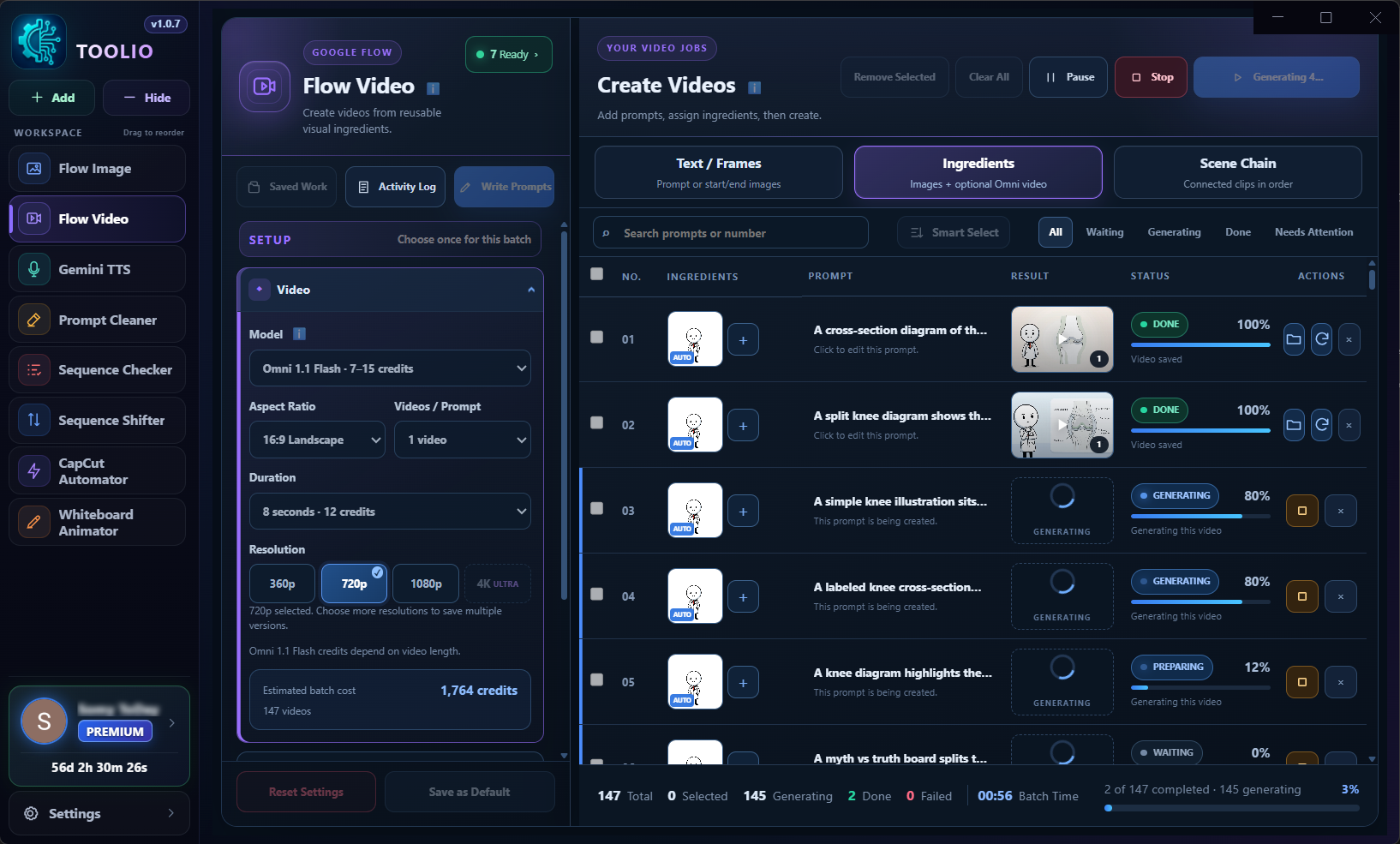
  • NEW🎬 Flow Video is now available. Create and manage video batches using Text/Frames, Ingredients, and Scene Chain workflows, with progress tracking and saved-work recovery.
  • NEW🖼️ Flow Image is now available. Run organized image batches from prompts and reference images, manage parallel jobs, and keep generated results inside recoverable sessions.
  • NEW🎙️ Gemini TTS is now available. Split long scripts into manageable voice parts and generate them in batches with voice, style, pace, accent, and audio controls.

🧩 Toolio Flow Helper

  • NEWAdded the optional Toolio Flow Helper Chrome extension for Flow Image and Flow Video.
  • IMPROVEDProvides a lightweight connection path to an existing Chrome session, reducing the need to launch the heavier automatic browser workflow.
  • FIXEDImproves Flow connection responsiveness and reduces the chance of browser-related 403 failures.
  • NEWIncludes connection status, guided setup, managed download support, and automatic opening of the Toolio website after first installation.

👥 Google accounts

  • IMPROVEDUpdated the Google Accounts Manager for clearer account readiness and connection status.
  • IMPROVEDImproved multi-account workflow handling for image, video, and voice batches.
  • NEWAdded supported credit visibility and clearer sign-in recovery guidance.
  • FIXEDImproved recovery when stored Google sessions become stale or require sign-in again.

⚡ Reliability and performance

  • FIXEDFixed the missing managed-browser files that affected the previous update.
  • IMPROVEDImproved recovery for interrupted Flow Image, Flow Video, and Gemini TTS work.
  • IMPROVEDPreserved provider error details so failed jobs show more useful guidance.
  • FIXEDAdded safer retry handling and reduced unnecessary Flow and TTS runtime load.
  • IMPROVEDImproved generated-file validation and protected completed results from accidental duplicate work.
  • IMPROVEDAdded stronger packaged-runtime integrity checks.

🔄 Updates and startup

  • NEWIntroduced a safer side-by-side update layout with a stable Toolio launcher.
  • IMPROVEDAdded integrity-checked staged releases, safer restart handling, and rollback-aware version state.
  • IMPROVEDProtected active work from update restarts until it is safe to continue.
  • FIXEDFixed startup splash timing and added the Toolio icon to desktop and Start menu shortcuts.

🎨 Interface improvements

  • IMPROVEDRefined the Flow Image, Flow Video, and Gemini TTS interfaces for clearer batch status and actions.
  • FIXEDUpdated the light theme and corrected contrast and layout issues across supported views.
  • IMPROVEDImproved responsive layouts, accessibility, and status guidance in the application.

🌐 Toolio website

  • NEWIntroduced the official Toolio Automation website at toolio.live.
  • NEWAdded product information, downloads, suggestions, community links, and an application showcase.
  • NOTEThe Toolio Store and purchasing workflows remain Coming Soon until officially announced.

Important

  • INFOToolio automates supported workflows; it does not include Google accounts, generation credits, API credits, or third-party subscriptions. Required accounts and credits must be supplied by the user.

Tools inside Toolio

Explore the generation workflows and media utilities included in the Toolio desktop app.

Eligible new users can start with a free Premium trial. No credit card required. Available once per eligible user. Download Toolio

Flow Video

Create and manage video batches using Text/Frames, Ingredients, and Scene Chain workflows.

Flow Image

Create image batches from prompts and references, with parallel jobs and live progress.

Gemini TTS

Split long scripts into voice parts and generate them in batches with voice, style, pace, accent, and audio-profile controls.

Edge TTS

Generate multilingual neural speech from long scripts with voice previews, adjustable rate, pitch and volume, plus optional SRT subtitles.

CapCut Automator

Prepare and synchronize CapCut projects through a guided workflow with project checks and preview steps.

Whiteboard Animator

Turn image batches into configurable whiteboard-style animations with drawing, timing, hand, color, processing, and output controls.

Sequence Checker

Scan numbered files to find missing and duplicate sequence numbers before processing.

Sequence Shifter

Preview and shift numbered file ranges forward or backward with padding, conflict handling, and undo support.

Prompt Cleaner

Remove repeated prefixes or patterns from batches of prompts while preserving the remaining text.

Other Tools

Toolio extensions and separate utilities will be listed here.

Suggestions

Vote on approved ideas or sign in to add your own.

Loading approved suggestions…

Add a suggestion

Join the Toolio Community

Follow releases, receive important updates, and connect with other Toolio users.

Coming Soon

Telegram Channel

Official Announcements — Get release notifications, download links, and critical maintenance notices.

Coming Soon

Telegram Community

Discussion & Troubleshooting — Ask questions, share workflows, and connect with other creators.

Coming Soon

WhatsApp Channel

Broadcast Updates — Fast, direct release alerts and platform status right on your phone.

Need direct assistance or enterprise inquiries? Contact our support team directly at support@toolio.live
support@toolio.live

Toolio Premium

One activation code unlocks the Toolio desktop tools for the published subscription period.

Free Premium Trial

Try every Premium tool before subscribing

Free

Full Premium access for a limited trial.

  • Every Premium workflow included
  • No credit card required
  • Available once per eligible user